A Logbook, rainy-day schedules, and Pause & go home
Meet the Logbook: blade hours, working hours and track distance, with reminders for the upkeep you care about. Weather rules can now hold your scheduled programs after rain, and Pause & go home sends Yarbo to charge mid-job and picks up where it left off. Plus 34 more fixes and improvements, most of them in the map editor and the Scheduler.
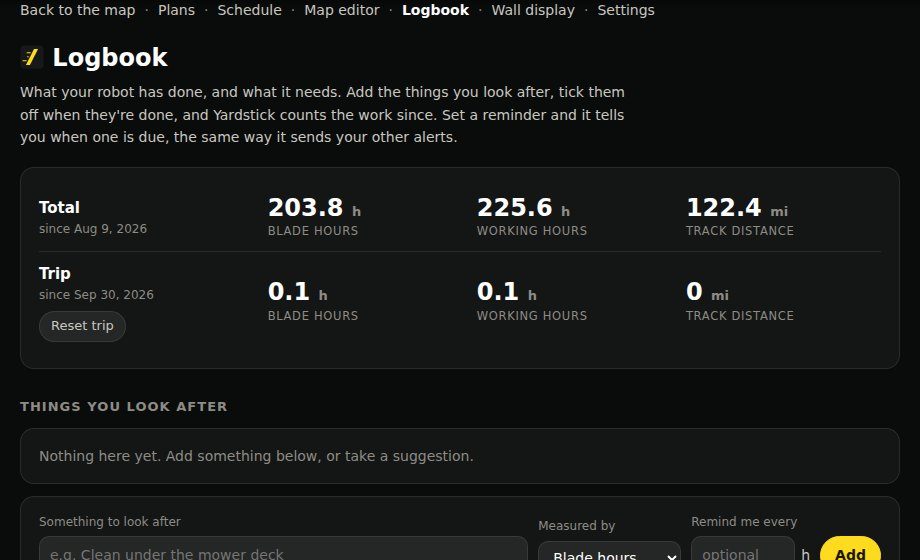
Where to find itLogbook, in the menu
All 37 changes14 new · 3 improved · 20 fixed
- New
Weather rules can hold your scheduled programs
A weather rule can now hold scheduled programs after rain, as well as closing no-go zones: every program, or only the ones you pick. A held program is skipped for that day and runs again at its next scheduled time, and the activity list says which rule held it. It only stops a program from starting; a job already out is left to the robot's own Rain Detection. If the weather can't be read, programs run as scheduled and the activity list says so.
- New
Weather Underground as a weather source
If your own station (Ambient, Ecowitt, Davis and most others) reports to Weather Underground, pick it in Settings, Weather, and enter your Station ID and the free API key Weather Underground gives station owners. It feeds the wall display and the weather rules like a Tempest does, and is read every five minutes.
- New
A Logbook
A new page in the menu that keeps track of your robot's work and upkeep. It lists every job from the recording, counts blade hours (time the blades were actually turning), working hours and track distance, and lets you tick off maintenance such as sharpening the blades or greasing the tracks. Each item counts up from when you last did it, and can remind you through your usual alerts when it is due. Add your own items and notes too. Nothing is set up until you choose it.
- New
Exact point moves in the map editor
When you drag a point, the editor shows how far it has moved and which way, in real distance at any zoom. Click a point and the arrow keys move it by 1 inch at a time, or 1 foot with Shift (1 cm and 10 cm in metric).
- New
Status on no-go zone schedules
Each schedule on the Schedule page now shows whether its zones are closed right now and until when, or when they next close, like the weather rules do. If the robot has a zone the other way from what the schedule wants, it says so, and it names a weather rule or another schedule that is holding a zone closed.
- New
Dead end settings
Select a dead end in the map editor and press Settings to change its mowing height and moving speed, the same as the Yarbo app.
- New
"Apply & save now" and a reminder of unsaved changes in the map editor
A zone's settings panel can save straight to Yarbo in one step, and a bar across the map lists anything not yet saved, with Save changes and Undo.
- New
The Plans page shows what each job button is doing
Pause, Resume, Pause & go home, End job and End job & go home now show that they are sending, say when Yardstick has passed the command on, and then confirm what Yarbo did (paused, heading home, on the dock). If Yarbo has not reacted within two minutes, the page says so.
- New
Pause & go home, and End job, on the Plans page
Pause & go home stops the job, sends the robot to charge, and keeps the job open, so Resume sends it back out to carry on where it stopped. End job finishes the job right where the robot is. The old Stop & send to dock button is now End job & go home, which does what it always did.
- New
Map backups now keep every zone's settings
Yarbo's own backups hold the map only, so restoring one used to leave every zone on its current settings. Yardstick now keeps a copy of each zone's settings (cutting height, speed, blower, snow blower and SAM) with every backup, and after a restore it shows which zones differ and puts back the ones you choose.
- New
Choose what the map shows when it opens
A new setting under Map imagery, "When the map opens, show", can open the map on Today, Yesterday, the last 7 or 30 days, or This year instead of All time. All time stays the default, and the date buttons on the map still change it whenever you like.
- New
Put your plans in your own order
The Plans page lists plans A to Z as before, and each one now has up and down arrows to move it. Your order is saved straight away and used everywhere plans are listed, including the Schedule. A new plan joins the end of your list, and Sort A to Z puts everything back in alphabetical order. Nothing about the plans on your robot changes.
- New
Page back through every battery run and every alert
"How long it runs on a charge" listed only the newest 20 runs, and "What Yardstick has told you" only the newest 25 alerts, so both looked as if the history stopped a week ago. Nothing had been lost. Both now show 25 at a time (or 10, 50 or 100), with Newer and Older to page back to the very first one, and a button to list them newest or oldest first. Your choices are remembered in your browser.
- New
Weather rules tell you when they act
When rain sets off a rule that holds your scheduled programs, you now hear about it straight away ("Rain hold on"), with the rule, what it holds and the last day it will hold if no more rain falls, and again when it lifts. A program it holds, and a no-go zone it closes or reopens, are told the same way. Every one is kept in "What Yardstick has told you", and there is a new switch, Weather rules, under Settings, Alerts, if you would rather the rules act without a message.
- Improved
The recording light moved
It now sits at the right-hand end of the date filters, under the weather, to make room for the Logbook in the menu.
- Improved
Zone settings in the map editor save with your other changes
Apply settings used to send each zone's settings to the robot straight away, with a backup every time. Now they wait with your other edits, Undo takes them back, and Save changes sends everything at once after a single backup.
- Improved
"Robot commands" in Settings is now "Start, pause and stop", under Access and login
It was taken for the old drive pad, which is long gone, so it no longer has its own place in the Settings menu. It is the same switch as before: whether this computer may start, pause, resume and stop your robot and send it to the dock, from the Plans page, the phone page and Home Assistant, with an optional password.
- Fixed
Charging from the power adapter was reported as not charging
With the power adapter plugged in, Yardstick went by the charging pad, so it raised "On the dock but not charging" and the battery panel said "Running on battery". It now goes by the battery itself: the panel says "Charging from the power adapter", and the alert no longer fires while the battery is taking charge.
- Fixed
Combine stopped working once the robot's backup slots filled up
Each Combine kept a backup of its own that was never cleared away, so after a few tries the robot's 10 manual backup slots were full and it refused the next one, which stopped the Combine. Combine now uses Yardstick's own safety backups, which clear themselves. And whenever the robot's backup slots are full, the map editor now says so in a notice in the middle of the screen, with a button that takes you to the backups to delete old ones.
- Fixed
The square's details kept popping up with Coverage turned off
Hovering the map showed a grid square's figures even with the Coverage layer hidden. The details now only appear while Coverage is on.
- Fixed
A failed map Save hid its reason
When the robot refused part of a Save, such as a Combine, the reason flashed up and was replaced a moment later by "Map loaded", so it looked as if nothing had happened. The reason now stays on screen, and every map change and every refusal is written to the log, so Send diagnostics shows what happened.
- Fixed
Saving a plan could drop its dead ends
Plans only listed zones, so opening a plan that included a dead end and pressing Save removed it. Plans now list your dead ends, each named with the zone it comes off, and keep them.
- Fixed
Obstacle avoidance and mowing height were wrong on the M1 mower
Yardstick used the Mower Pro's settings for every mower. On an M1, a new obstacle avoidance mode was saved where the M1 never reads it, so the Yarbo app kept showing the old one, and mowing heights read up to 0.4" too low and were set higher than chosen. Yardstick now uses the M1's own obstacle setting and height scale, and no longer shows the M1 an Ultrasonic switch it does not have. The Mower Pro is unchanged.
- Fixed
Saving zone settings could undo a change made elsewhere
The map editor sent every setting it read when you opened a zone's settings, so a change made after that, in the Yarbo app or by Mowing direction, was put back when you saved. Now only the settings you changed are sent, and each one is read back from Yarbo afterwards. If Yarbo did not keep one, the editor names it.
- Fixed
The Schedule could send the robot back out after you stopped it
When a scheduled job came home part way, Yardstick treated it as a charging break and carried on once the battery was up, even if you had ended the job in the Yarbo app or the robot had come in for rain. Now Yardstick only carries on when the robot itself says it stopped to charge. Any other trip home waits for you.
- Fixed
A plan mowing the master area with other zones striped two ways
With Mowing direction on, a plan that included the master area and other zones cut the master at its new angle and the other zones at the old one, in the same job. Now every zone in such a plan cuts the new angle together. Other plans are unchanged.
- Fixed
Some zones showed their obstacle avoidance as "not recognized"
On some zones (often driveways) the robot stores an extra flag alongside the avoidance mode, and the map editor could not read the mode there. It now shows the mode the Yarbo app shows, and keeps the flag when you change a setting.
- Fixed
A misleading message when checking for updates
If the page could not reach Yardstick at all, for example because Yardstick had stopped, Check for updates blamed the update server. It now says Yardstick could not be reached and to refresh the page.
- Fixed
Route failures were missing from Error codes
When the robot gives up on its route (for example fault -48, or WP005 Failed to Calculate Route), Yardstick raised an alert but never listed it under Error codes. They now appear there as Route planning, with Yarbo's own name for the code where Yarbo publishes one.
- Fixed
"charging" was shown while Yarbo was still driving home
The home page, wall and Plans page now say "heading home" until Yarbo is on the dock. The map editor also stays locked until then, so a map change cannot be saved while Yarbo is still driving a route back.
- Fixed
Fall Cleanup and Spring Up sometimes showed no zones
When the robot was slow to answer, the page said "No mowing zones yet" instead of listing them. It now uses the copy of your map Yardstick already keeps, and if it truly cannot read your zones it says so.
- Fixed
An empty Robot dropdown on Fall Cleanup and Spring Up
With one robot there is nothing to choose, so the dropdown is hidden again.
- Fixed
Switching robots could lock you out of your Yarbo account
With more than one robot, every switch in the map editor signed in to Yarbo again, and enough switches made Yarbo refuse the sign-in for a while. Yardstick now keeps one connection per robot, so switching is instant and signs in once.
- Fixed
Vision zones were called no-vision zones
The map editor used an old name for them. Yarbo uses vision-based obstacle avoidance inside these zones, and the Yarbo app calls them Vision Zones, so Yardstick now does too. Nothing about the zones themselves changes.
- Fixed
The Start, pause and stop switch showed off when you opened Settings
Even when commands were switched on, the switch under Access and login showed off, and saving that card as it stood turned them off. It now shows how it is really set.
- Fixed
Places lost their names after you combined or deleted zones
Trouble spots recorded in a zone you later combined or deleted said "Unnamed area", and older runs in the battery table could show a bare area number. Yardstick now finds the old name in your map history and says where that ground is today, for example "Zone 6 (now part of Front Yard)", or "no longer on your map" if the zone was deleted.
- Fixed
On Windows, Yardstick stayed stopped if it ever crashed
Windows only restarted Yardstick when it failed to start, not when it stopped later, so a crash in the night could leave your schedule idle until the computer was next restarted. A small watchdog now checks every five minutes and starts Yardstick again if it has stopped. It leaves it off if you have turned off starting automatically, and each restart is noted in a log Yardstick keeps.