Release notes

November 2026

2 releases, newest first.

v1.2.20

Your map stays live through every job again

Yarbo has updated the way it sends its updates on its newest firmware (3.14.40 and later). Yardstick now improves its integration with this firmware update.

Where to find itnothing to set up. It works as soon as Yardstick updates.

All 9 changes2 improved · 7 fixed
  • Improved

    A proper Yardstick screen while your map is built

    When a date range takes a moment, the map shows a Yardstick card that says what it is putting together (for example 30 days of your robot's readings) and that the map will appear when it is ready, in place of the plain spinner. It never pretends to show progress, and it keeps still for anyone whose computer asks for reduced motion.

  • Improved

    A faster map while Yarbo works

    Each refresh now adds only the new readings instead of redrawing Yarbo's whole track. On a very long history a refresh went from 3 seconds to under a third of a second, and other pages no longer wait behind it.

  • Fixed

    Stuck alerts tell the truth

    "Wheels stopped with a job still open" could arrive a minute after Yarbo had ended its job. A job now counts as open only when Yarbo itself says so, and a Yarbo left out in the yard after a job ends gets its own message: "Left sitting out in the yard: no job is running, and it is not on the dock."

  • Fixed

    The map editor opens faster on a new computer

    It no longer repairs Split links every time it opens. Yarbo decides those links itself, so the repair never stuck; it only cost a backup, a save and up to a minute.

  • Fixed

    A one-point direction line no longer blocks saving its pathway

    The map editor names the line and offers to show it or remove it.

  • Fixed

    Split explains a border that crosses itself

    Instead of "That line only clips a corner" on every cut, Split says the area's border crosses itself, marks the spot and offers to fix it, and Undo puts it back. Send diagnostics now includes your map outlines, so support can find a spot like this without a screen share.

  • Fixed

    The aerial photo in the map editor stays visible when your map lines up

    When two ways of lining your map up with GPS were available, the editor could use the one that did not fit and hide the photo. A lineup that fits now always wins.

  • Fixed

    "On the dock but not charging" no longer appears while Yarbo rests a full battery

    Once the pack is full, Yarbo holds it at about 94 to 95% on the dock, and Yardstick read that as a stalled charge. A pack at 93% or more now counts as full.

  • Fixed

    The map opens far enough out to see your yard, and the aerial photo stays sharp

    A day that covered a small patch used to open the map very close, so the photo looked blurry and zooming out stopped short of the property. Now the map opens no closer than your yard map.
v1.2.19

Drive off the dock for a better GPS signal, and Lights after dark

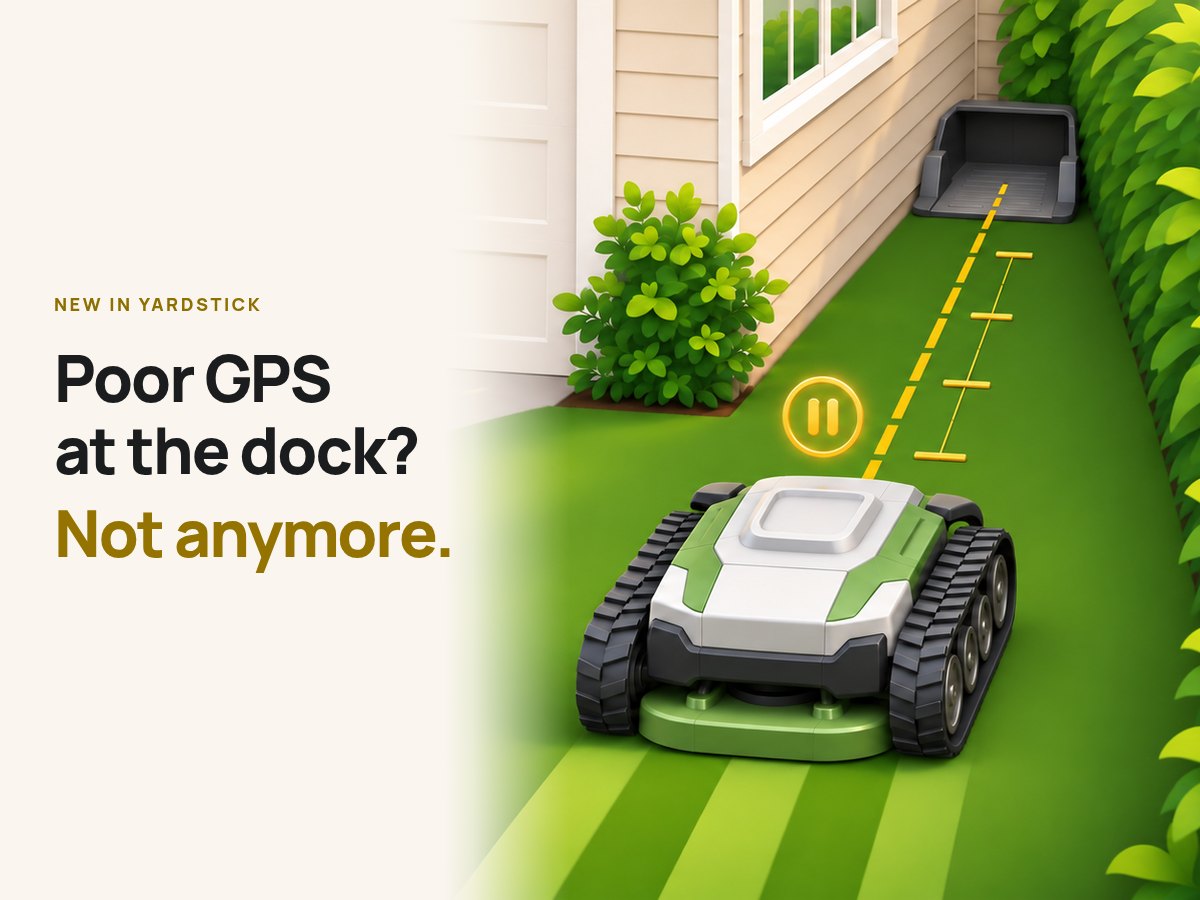
Under an awning, beside a wall, or just in a weak spot, Yarbo can struggle to get GPS on its dock, and a job may not start. Often a few feet is all it takes: Yardstick now drives Yarbo straight out into the open first, gives it time to pick up a better signal, then starts the job. You choose how far and how long it waits, Yardstick checks Yarbo's map so it stops inside a work area, and it stays off until you accept the risk and watch a dry run. See how drive off the dock works.

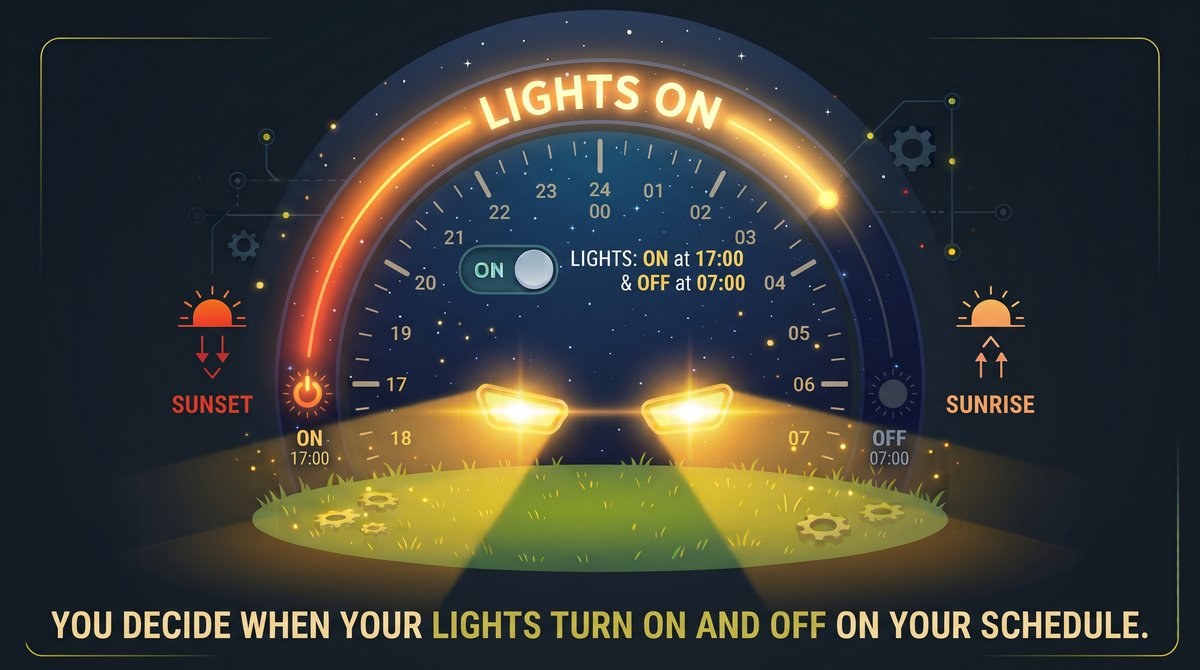
And when a job runs into the dark, Lights after dark turns on every light on Yarbo for the whole job, driving out, working and driving home, on the schedule you set from sunset and sunrise. See how Lights after dark works. This release also brings a preview of the route before every start, Work Preferences, no-go zones on the map, Yarbo's new area settings for firmware 3.14.40, and a long list of fixes.

Poor GPS at the dock? Not anymore. Yarbo paused just off its dock, on a straight gold line.
Lights after dark: Yarbo's lights on from sunset to sunrise, on the schedule you set.

Where to find itSettings, under Robot: Drive off the dock, and Lights after dark

All 35 changes7 new · 9 improved · 19 fixed
  • New

    Drive off the dock before every job

    For a Yarbo that struggles to get GPS on its dock. In Settings, under Robot, Drive off the dock explains what happens and what the risks are, then lets you choose how far Yarbo drives straight forward, 1 to 10 ft, and how long it waits after, 30 seconds to 5 minutes.

    Before any job Yardstick starts while Yarbo is on its dock (a plan, a program, Run now, or carrying on after quiet hours or a charge), it drives straight forward that far, stops, waits, then starts the job. It measures the distance with the wheels, so it does not need GPS for that.

    Yardstick works out from Yarbo's map where it would stop: the distance must stop Yarbo inside a work area, a pathway does not count, and it must not stop in or drive through a no-go zone. Settings shows which distances pass and, for the others, why not. It checks again before every job; if the check fails, or the dock has moved since the dry run, Yarbo does not drive off, the job starts from the dock as usual, and you get an alert.

    Nothing on the attachment is turned on while it drives off. It drives blind: there is no camera or ultrasonic obstacle detection, and the bumper is the only protection. So before it can be on, you accept that risk and then watch a dry run: you confirm Yarbo is on its dock, its path is clear and you can stop it, and it drives out the set distance and stops, with no wait and no job.

    You confirm it passed, then turn it on after one last check. Turning it off clears your acceptance and the dry run, and so does choosing a new distance, so turning it on again means every step again. If the bumper is hit or Yarbo reports a fault, it stops where it is, the job does not start, and you are told; if the job has not begun a few minutes after a drive off, you get an alert.

    Each Yarbo has its own setting, picked from the Setting for list. Jobs started in the Yarbo app, and Yarbo resuming a job on its own, start from the dock as before. The step-by-step guide is at yardstickhome.com/support/drive-off-the-dock.

  • New

    Lights after dark

    In Settings, under Robot, Lights after dark turns on every light on Yarbo while it works in the dark: driving out to its work area, working, and driving back to its dock, for every job, including each time it goes back out after charging, even in the middle of the night.

    If Yarbo is already out working when it gets dark, the lights come on then. They go off when Yarbo is back on its dock or has a fault, and shortly after it is paused, stuck or stranded, or a job ended early and left it sitting. A job has to be running; driving Yarbo by hand does not turn them on.

    Press Lights in Yardstick during a job and the lights are left to you for the rest of that job. As a job starts the lights may flash a few times: Yarbo switches them off itself while it plans its route and as it starts to work, and Yardstick turns them straight back on, checking with Yarbo each time until it reports them on. The same goes for turning them off.

    A support page explains it all: yardstickhome.com/support/lights-after-dark. It follows sunset and sunrise where Yarbo works, every day of the year, so the lights come on earlier as the days get shorter, and you can move either end earlier or later, the same way as a daylight schedule, for example lights on an hour before sunset.

    It works with every attachment, and each Yarbo has its own. Yarbo's own Auto light mode would turn the lights off again, so turning Lights after dark on switches it off, with the same checked save as Work Preferences, and turning it off puts it back. It is off until you turn it on.

  • New

    See a plan's route before you start it

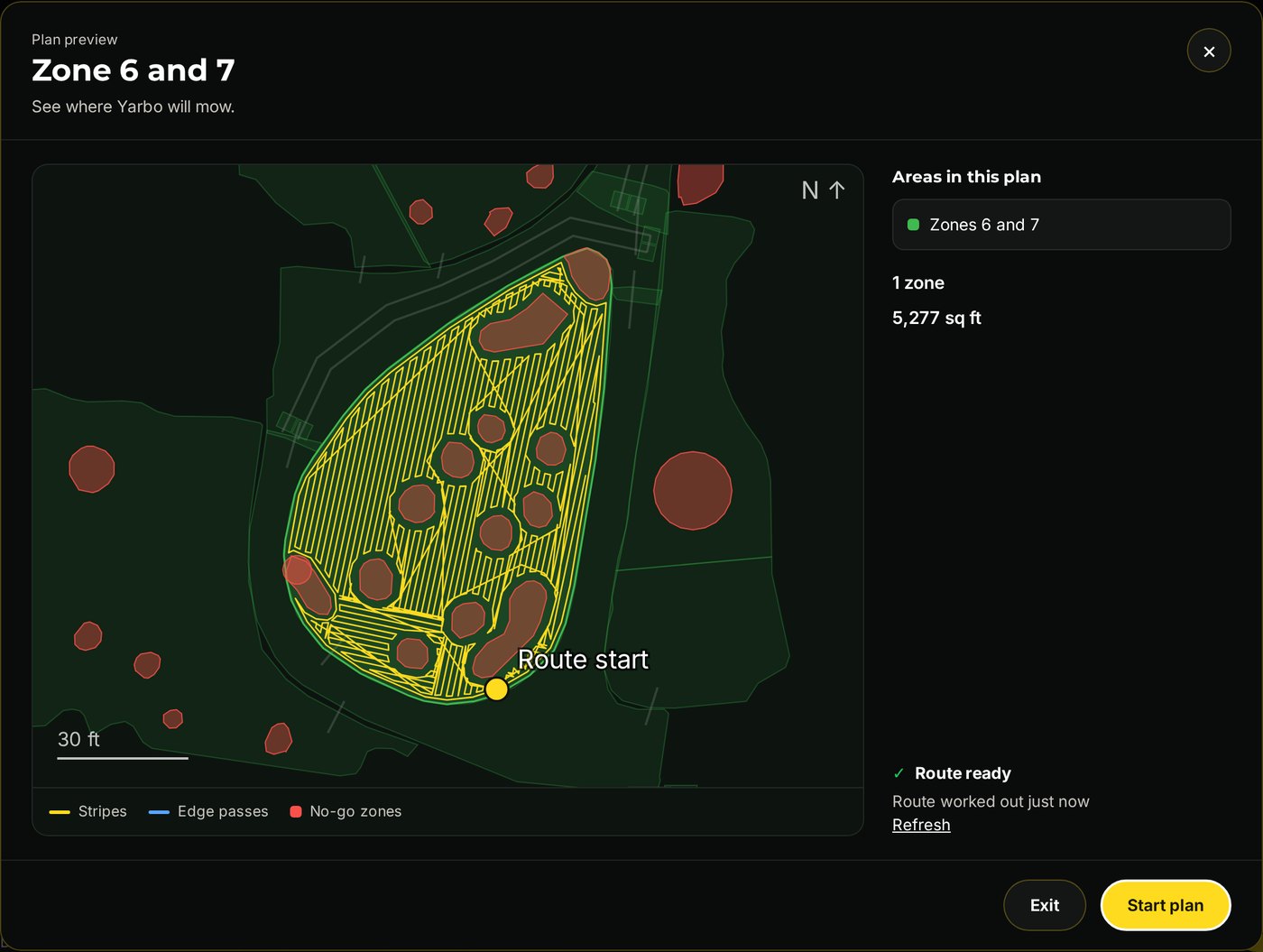
    Start, on the Plans page or in Quick run on the map, now first opens a preview of the plan: its areas on your yard map with the route Yarbo will take drawn on them, the mowing stripes and the edge passes, where it starts, and how big the plan is and how long it usually takes.

    Yarbo works the route out itself, the same preview the Yarbo app shows, which takes about a minute; the map shows at once and the route draws in when it arrives, and you can start without waiting. Start plan sends it as usual; Exit closes the preview and sends nothing.

    A route worked out in the last few hours shows straight away. It is on to start with; untick the box to start plans straight away as before.

    The route preview for Zone 6 and 7: the stripes Yarbo will mow, the no-go zones it works around, where it starts, and Start plan.
    The route preview for Zone 6 and 7: the stripes Yarbo will mow, the no-go zones it works around, where it starts, and Start plan.
  • New

    No-go zones in red on the map

    The map now draws every no-go zone from your Yarbo in red, so you can see at a glance where Yarbo will not go. The red is see-through, so the photo, the coverage and the path still show through it, and Yarbo's own dot stays on top. A no-go zone that is turned off right now, by a schedule, a rain rule, the map editor or the Yarbo app, has only a faint dashed red edge, because Yarbo may go there.

    It is on to start with. The No-go zones button under the map, beside Yard map, turns the red off and on again; off, they are gray as before. Your choice is remembered on this computer, for everyone who uses it. The Yard map button still hides or shows them.

  • New

    Work Preferences

    Settings has a new Work Preferences section, under Your Yarbo, with the robot-wide settings from the Yarbo app: undock and recharge battery levels, recharge turning mode, rollover and tilt detection, lift detection, auto light mode, rain detection and its sensitivity, adaptive slope, low battery auto shut-off, smart route, and the snow blower's anti-freeze, auger battery level, Docking Station cleaning and snow throw direction, Auger in work plan and Snow intake effect.

    Each Yarbo has its own. Every change is read back from Yarbo to prove it was kept. You can back them up and put them back, even onto another of your Yarbos, and Yardstick keeps a copy before every change it makes. A full backup of the Core includes them, and restoring one puts them back.

    Choose Mower, Snow blower, Leaf blower or Trimmer at the top to see the settings for that module and the ones every module shares, as the Yarbo app does. It starts on the module that is attached.

  • New

    End program on the Schedule page

    When a program is paused, waiting out quiet hours or a charge, its card on the Schedule page now has an End program button. One click, after you confirm, and Yarbo will not carry on with it; the program still runs again at its next scheduled time. If Yarbo is still holding that program's job, Yardstick ends that too; anything else Yarbo is doing is left alone.

  • New

    Yarbo's new area settings, for firmware 3.14.40

    On a robot with Yarbo's firmware 3.14.40 (Yarbo app 3.19.9), the Map editor's area settings offer the same choices as the Yarbo app: Turning Mode is Zero Turn, Smart Turn, U-Turn or the new Curved Turn, and Overlap is Efficient, Standard, Thorough or Intensive. Robots on older firmware keep the choices they had.

    A setting the robot holds that none of the choices match is shown as it is, selected, and kept.

  • Improved

    Recover brings back the whole job

    Recover on the map's "Job ended early" notice is offered after any job that ended early, however little of it got done, and a robot stopped out in the yard can be recovered where it sits, without driving it home first. When the scheduler gives up a program part way, Recover starts the plan that stopped and then carries on with the rest of the program and its remaining passes, as the schedule would have, and the schedule never starts that run a second time.

    It names everything it will run and asks before sending anything. Pressed during quiet hours, it starts and quiet hours send it straight back, as with any start.

  • Improved

    A tidier map editor toolbar, two ways

    The map editor's toolbar comes two ways, and a button at the right end of the toolbar switches between them; Yardstick remembers your choice on that computer. Expanded, the default, keeps every control spelled out in labeled groups, with the selected shape's controls on a second row that keeps its height, so selecting a shape no longer moves the map.

    Compact is one tidy row of small pictures with short labels, the same on every screen size. Hover over any picture for what it does and its keyboard shortcut. Add shape and the two line tools sit behind small menus, Driveway sweep and the shape's name box stay on the bar, and the selected shape's controls (or the actions for several selected shapes) fill the middle of the row.

    The wider the toolbar (a bigger screen, or the side panel folded away), the more Compact shows: the zone's full size, a wider name box, then how to resize. With the side panel folded away, a Layers button over the top corner of the map, just under the toolbar, opens the layer switches and shows how many are on. In Compact every button is the same size, with the same space between each.

    Expanded: every control spelled out in labeled groups, with the Compact and Expanded switch.
    Expanded: every control spelled out in labeled groups, with the Compact and Expanded switch.
    Compact: one row of picture buttons, with Undo, Redo, Save and the Expanded button at the right.
    Compact: one row of picture buttons, with Undo, Redo, Save and the Expanded button at the right.
    Compact with a shape selected: its name, Rename, Copy, Split, Combine, Delete shape, Settings and the height buttons join the same row.
    Compact with a shape selected: its name, Rename, Copy, Split, Combine, Delete shape, Settings and the height buttons join the same row.
  • Improved

    A rain hold holds when rainfall cannot be read

    If your weather source stops reporting, a weather rule cannot tell whether it rained. Until now the programs it holds ran anyway, with a note in the Activity list. Now they are held to be safe, and each skipped run sends you an alert saying rainfall could not be read, so you know to check the station.

    A program already out carries on, and pressing Start always runs a program by hand. The Weather rules card says "programs held" while the weather is unavailable, and the rule editor says so too. (Robot path: needs a live run before release.)

  • Improved

    The map sends only what changed while the robot works

    An open map refreshes every 20 seconds, and while the robot was working each refresh sent the whole coverage map again, several megabytes for a month of mowing. Now it sends only the squares that changed and the new stretch of path, and the page redraws from that. Opening the map, or coming back to it, still loads the whole map.

  • Improved

    4G signal is shown as a percentage

    The robot card on the map showed the 4G signal as a number out of 31, such as "20 of 31", which said little to most people. It now shows a percentage, 65% in that case, the same way Wi-Fi is shown.

  • Improved

    Fault codes 903, 911 and 912 say what they are,

    in the Yarbo app's own words: the module loosened, and the left or right cutting motor drive, instead of only the number.

  • Improved

    Moving to Yardstick Anywhere brings each core's newest backup

    The latest "Back up everything" file of each core goes with the move, without its drone photo, so Replace a core on Yardstick Anywhere can put that yard onto a new core later. Older backups stay on this computer, which can still restore them.

  • Improved

    A restore that refuses says why in the log

    When a restore stops because the core is not docked or not idle, the log now keeps the readings behind that, so diagnostics show what the core looked like.

  • Improved

    Yardstick records the snow blower's auger readings for future alerts

    While the snow blower is on, each recording now keeps the auger motor's current and speed, its fault and temperature state, the auger height and the chute's angle and faults. Nothing changes on screen yet: this builds the history Yardstick needs to learn what a healthy auger looks like on your Yarbo, so it can later warn you when a shear pin may have broken. Nothing extra is kept while the mower or another attachment is on.

  • Fixed

    End job and the other job buttons show what the robot did within seconds

    A robot charging on its dock while holding a job sends nothing on its own, so after End job the page waited for the next five-minute status check, gave up at two minutes and said Yarbo had not reacted, even though the job had ended at once. Now, after End job, End job & go home, Pause, Resume, Pause & go home or a start, Yardstick asks the robot for its status a few times over the next minute and stops as soon as the change shows.

  • Fixed

    A few seconds of impossible position readings no longer throw off the map

    Each reading gives the robot's position twice, from GPS and from its own map, and the two agree to about a meter and a half. A robot that reported a GPS fix 630 m away and then a map position 48 m off could push the yard's lineup past its limit, so the yard outline and the aerial photo would not line up, and the far fix stretched the day's map.

    Now readings more than 10 m out against the rest are left out of the lineup. New: once an hour Yardstick looks at what was recorded since its last look and removes readings like these by itself, so the map and photo put themselves right; nothing to press.

  • Fixed

    False alerts on Yarbo's newest firmware (3.14.40)

    On that firmware a robot that is full on its dock stops saying it is charging, and wakes from sleep every few minutes. Yardstick took that for a robot out working, so ordinary GPS dips on the dock raised "GPS fix lost", a robot asleep on its dock was reported as lost contact, and the 0% battery it reports for a moment after a reboot was reported as a flat battery.

    A robot at its dock no longer raises "GPS fix lost", a docked robot counts as lost only after 15 minutes of silence, and a reading of exactly 0% no longer counts as a flat battery. Out working, all three alerts work as before. (Robot path: needs a live check before release.)

  • Fixed

    A restart no longer locks the box out of Yarbo

    Each part of Yardstick that talks to Yarbo (recording, the map, robot names, robot control) used to sign in on its own, and every restart, update included, sent several sign-ins within seconds. Yarbo answered with "Too many login attempts" and then refused even the right password for up to a quarter of an hour, and recording stopped meanwhile.

    Now the whole app shares one Yarbo sign-in, keeps it across restarts and updates so it resumes without signing in again, and renews it as one. If Yarbo turns a sign-in down, Yardstick waits before trying again instead of trying from every part at once, and the log keeps what Yarbo actually said. A password typed on the Settings page is still checked by Yarbo straight away.

  • Fixed

    The cut path follows the middle of the robot

    It was drawn from the robot's left GPS antenna, about 20 cm to one side, so a pass right along a planned line was drawn beside it. It now follows the middle of the robot, where the robot itself and the planned route are drawn. It is also drawn in finer detail: a job's passes keep their shape instead of being cut into slanted lines.

    Days and weeks get the finer drawing; a whole history and days already saved are drawn as before.

  • Fixed

    The "Job ended early" notice stays until you choose, and Dismiss means gone

    It used to clear itself within minutes, taking Recover with it; it now stays until you press Recover or Dismiss, for up to three days. A dismissed notice no longer comes back when the page refreshes, when you open Yardstick again, after Yardstick restarts, or once Yarbo stops reporting the job as ended. A job that ends later still gets its own notice.

  • Fixed

    What happened? works in every Errors layout

    In the Timeline and By code layouts it did nothing; it now opens what was unusual around that moment under the fault, as a full-width panel with its readings laid out in rows, as it already did in the Table layout.

  • Fixed

    A single garbled battery reading no longer raises Battery too hot to charge

    The six battery cells are reported together every few minutes. A stray partial message carrying one cell alone, at 54 °C between full readings of 28 to 30 °C, was taken as the battery's temperature and raised the alert. Now the battery temperature comes from the newest full reading, and one cell far above the others counts only when two readings in a row agree.

    A battery that really gets hot still alerts, and the Battery page's Battery temp follows the same rule.

  • Fixed

    Plans opens straight away

    The plan list no longer waits on a map editor check it does not use.

  • Fixed

    "Update available" no longer lingers after the update

    A page left open while Yardstick updated itself kept offering the version it was now running, and Settings kept showing the old version number, until the page was reloaded. Both now follow the running version on their own.

  • Fixed

    Ending a job during quiet hours clears the Paused card

    If a job held over quiet hours was ended, in the Yarbo app, on the robot, or with End job in Yardstick, the Schedule page went on saying it would carry on in the morning. It now notices while quiet hours are still on and clears the card.

  • Fixed

    Weather rules follow your units

    With metric chosen, a weather rule still asked for and showed its rain amount in inches. It now asks for and shows millimeters, and a rule you already have keeps working as it was: 0.10 inches shows as 2.5 mm.

  • Fixed

    Pathways and dead ends get the Moving Speed slider on Yarbo's newer cores

    On the Y40 series and the Yarbo Mini, area settings already had the Moving Speed slider, 0.1 to 1.2 m/s, but pathway and dead end settings still showed the older cores' five presets. The Yarbo app uses the slider on both, so now the Map editor does too. The older cores keep their presets.

  • Fixed

    Restoring a backup puts back every shape's settings

    Restoring a map backup now checks and puts back every shape's settings, not just areas and dead ends. Each backup keeps the settings of every pathway, for each attachment, and of every sidewalk, so after a restore the editor lists any that differ and can put them back.

    It no longer says everything matches when it did not check pathways and sidewalks: a backup from before this change says so. A shape whose settings could not be read is named instead of left out. Restoring a backup from a Y40-series core or a Yarbo Mini onto an older core now moves each Moving Speed to the nearest speed the older core offers, and the preview says so.

    A Core restore now names the settings of a shape already on the robot that differ from the backup, such as on/off, instead of saying the robot did not keep a change. The app's own backup (Settings > Backup) now carries these settings copies to a new computer, so restoring a map backup there no longer says Yardstick has no copy of them. A full backup of the Core taken without reaching Yarbo now includes pathway and sidewalk settings too.

  • Fixed

    The map editor shows how far you moved something while you are moving it

    Dragging a point shows the distance, and how far east or west and north or south, as you drag, as it did before 1.1.15, instead of only after you let go. Dragging a whole shape or a lasso group now shows it live too.

  • Fixed

    The wall asked for its map twice every few seconds

    While the map slide was showing, the wall display asked Yardstick for the map twice in a row on every refresh. It now asks once, and still asks straight away when the map slide first appears so the picture fits the screen.

  • Fixed

    The scheduler no longer says the robot went back to the dock when it stopped out in the yard

  • Fixed

    The map's Coverage button tip no longer says the metric is picked "on the right"

    The picker is on the right on a desktop monitor and on the left on a laptop, so the tip now names it: Color the map by.

  • Fixed

    The map editor no longer says a plan is "only" so far complete

    while Yarbo is out working; it just says how far along the plan is.

Yardstick is an independent tool for Yarbo robots. Not affiliated with Yarbo Inc. · © 2026 Yardstick Technologies LLC.