Where it lives
Open Logbook from the links at the top of any page. If you have more than one robot, each has its own Logbook.
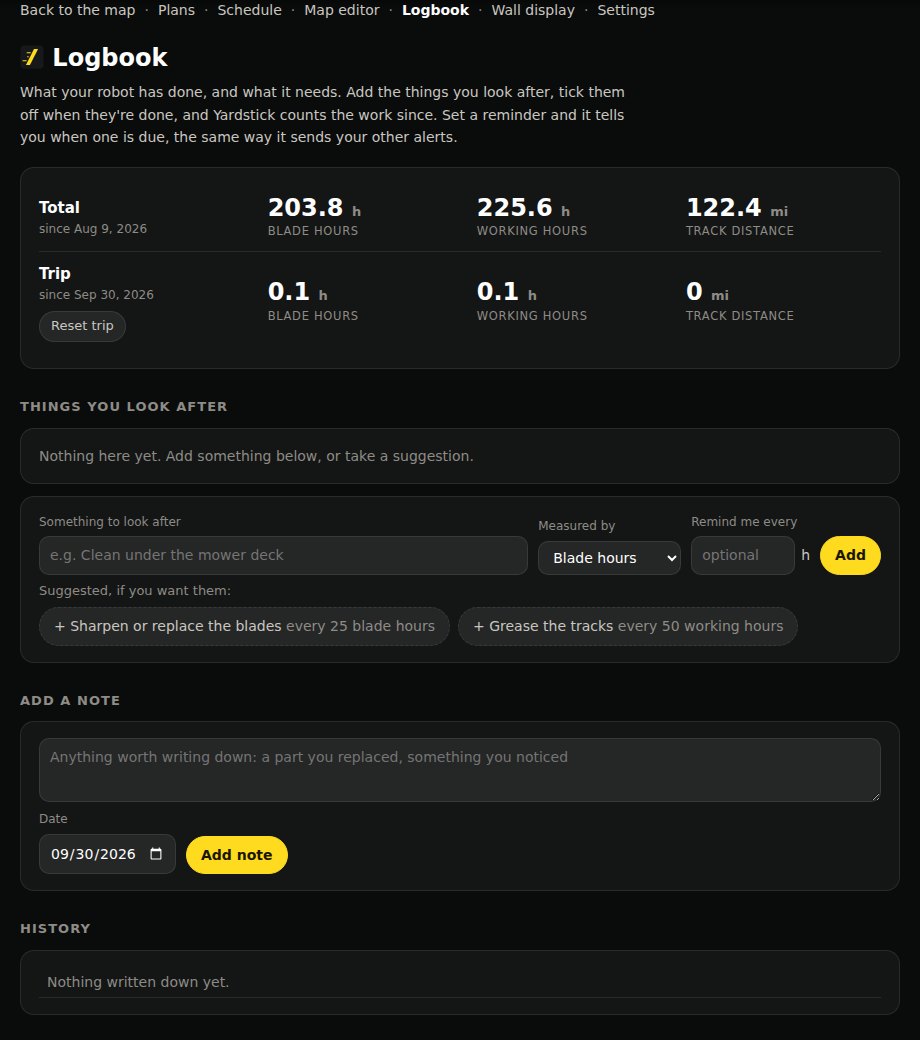
Totals and the trip meter
The card at the top works like the dashboard of a car.
Total
Everything since Yardstick started recording, like a car's total mileage. These figures are kept for good, even after the detailed recording is trimmed.
Trip
A trip meter you reset whenever you like, to watch the work over a period of your own: a season, a month, the time since you changed something. Press Start a trip the first time. After that the button reads Reset trip, and asks you once more before it goes back to zero.
| Figure | What it counts |
|---|---|
| Blade hours | Time the blades were actually turning. The drive out, the drive home and any time paused do not count, so this is the figure for blade wear. |
| Working hours | Time the robot was out working. |
| Track distance | How far the tracks have driven, from the robot's wheel odometer. Shown in miles, or kilometers if you use metric units. |
Things you look after
Each item counts up from the last time you did it, measured the way that suits it.
Take a suggestion
Two are offered: Sharpen or replace the blades every 25 blade hours, and Grease the tracks every 50 working hours. Click one to add it. The intervals are a starting point; change them with Edit to suit your yard and your manual.
Or add your own
Type it under Something to look after, choose what it is Measured by (Blade hours, Working hours, Track distance or Days), and optionally Remind me every so many of those. Press Add.
Tick it off
When you've done it, press Done. You can set the date you did it and add a note, then press Tick it off. The count starts again from that day.
Edit or remove
Edit changes the name or the reminder. Remove takes the item away; what you ticked off stays in the history.
Reminders
Give an item a Remind me every figure and Yardstick tells you when it comes due.
Once per interval
The item shows a Due badge and you get one message, titled Maintenance due and the item's name. It is not repeated. Tick the item off and the next reminder comes after another full interval.
The same way as your other alerts
Reminders go wherever your alerts go: email, a phone notification, the screen. They also appear in What Yardstick has told you on the map page, with how each one reached you.
Turning them off
To keep the counters but stop the messages, turn off Maintenance reminders from the Logbook in Settings → Alerts. Clearing an item's reminder in Edit stops just that one.
Notes and history
Use Add a note for anything worth writing down: a part you replaced, something you noticed. Set the date if it wasn't today and press Add note.
History lists your ticks and notes, newest first. The × beside an entry removes it; press it twice to confirm.
Jobs
Below the history, Jobs lists each run from the recording, newest first: the date, the plan, the time spent mowing and the area covered. Nothing to type. It covers the period your recording keeps.