Where it lives
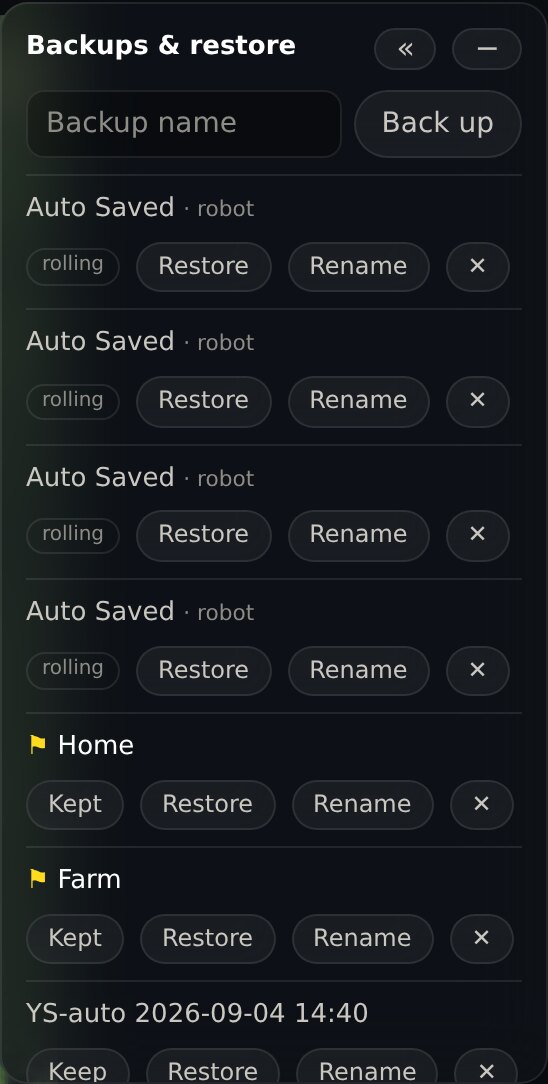
Open the map editor and look at the Backups & restore panel in the top right.
Taking one
Type a name and press Back up. Name it for what it is, not the date: Before the new flower bed beats backup 4.
Keeping one
Press Keep on any backup you took yourself and Yardstick will never prune it, no matter how many automatic snapshots pile up behind it. Kept backups show a flag, and deleting one asks you to confirm you meant it.
Keep is for backups you took
It is not offered on the robot’s own Auto Saved entries, which show as rolling.
Why not
Yarbo replaces those on its own schedule and nothing Yardstick does can stop it. Offering Keep there would be a promise we cannot keep.
To hold on to one of those
Restore it, then press Back up with a name. That gives you a real backup of that map, which you can then keep.
Restoring
Press Restore
It replaces your current map and drops any unsaved edits, so it asks first.
It checks before it acts
Yardstick confirms the backup on the robot is still the one you clicked, by name and by when it was taken. Yarbo reuses backup numbers, so the number alone is not enough to be sure.
What comes back
The whole map, and the per-area settings with it: blade height and speed, gap, edge behavior, mowing direction.