Support / Yardstick Anywhere / Text message alerts Search help
Text message alerts on Yardstick Anywhere
Add your mobile number and Yardstick Anywhere texts you when your robot needs you urgently. Everything else comes by email and the app, so the texts stay rare.
What you get a text for
Only urgent problems:
Add your number
Open Settings, then Alerts
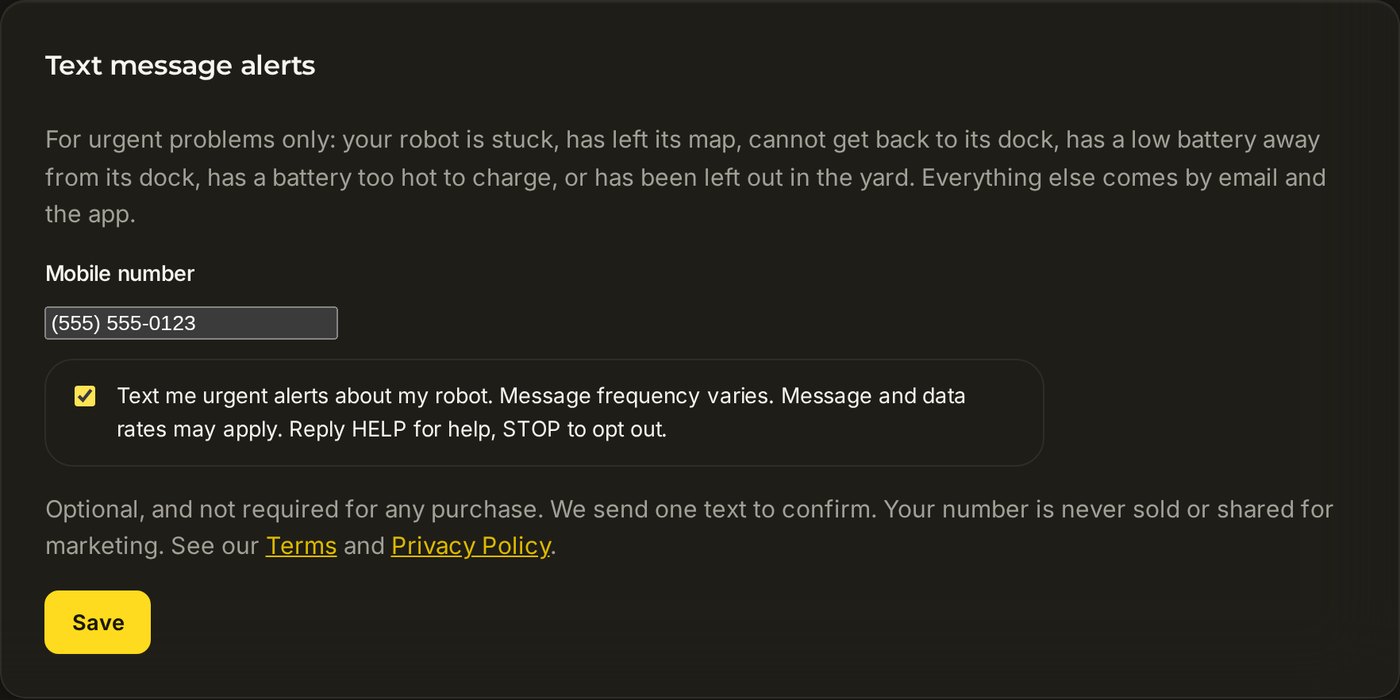
Sign in at portal.yardstickhome.com, press Settings, and choose Alerts on the left. Text message alerts is the last card.
Type your mobile number and tick the box
Any US or Canadian mobile number. The box is your permission to text you; it says exactly what you are agreeing to.
Press Save
A green line at the top says the alerts are on and that a confirmation text is on its way.

The confirmation text reads: "Yardstick alerts: you will get texts when your robot needs you urgently. Msg frequency varies. Msg & data rates may apply. Reply HELP for help, STOP to opt out."
Stopping them
Reply STOP to any text, or untick the box in Settings → Alerts and press Save. Reply HELP for help. Your number is used only for these alerts: it is never sold or shared for marketing. See the Terms and Privacy Policy.
It says that does not look like a US or Canadian mobile number
Text alerts go to US and Canadian mobile numbers only. Type the ten digits, with or without spaces and brackets.
I did not get the confirmation text
Check the number in the card. If you replied STOP to one of our texts, tick the box and press Save again to switch them back on.
The card is missing, or only the owner can change it
Text alerts are part of Premium, and only the yard's owner can turn them on.